MFA Sign‑In Alerts Are Being Used to Trigger Callback Scams
Click here to view/listen to our blogcast.
A new phishing campaign is circulating that looks legitimate at first glance and is especially dangerous because it blends real security language with fake financial panic. We have now seen multiple versions of this email, and one example is shown below.
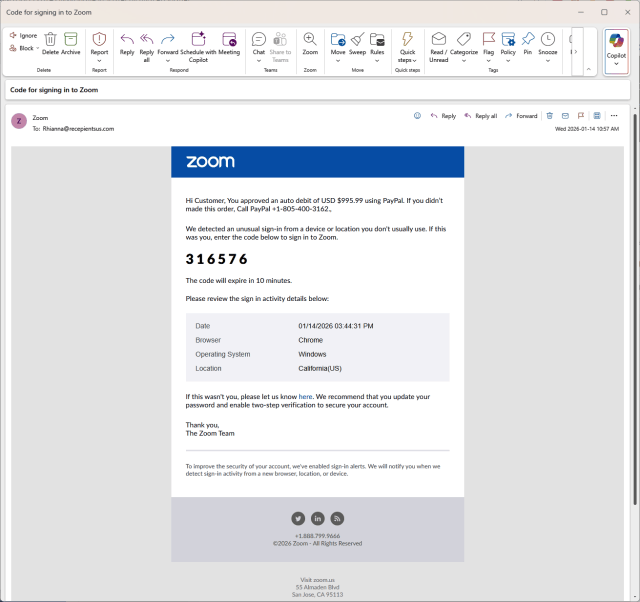
This message pretends to be a Zoom sign-in alert, includes a one-time verification code, and then abruptly claims that a $995.99 PayPal auto-debit was approved. The goal is not to steal credentials directly. The goal is to make the recipient call a fake support number.
This is a textbook example of a modern callback scam.
What the Email Claims
The message combines several elements that are normally trustworthy when seen individually:
- A Zoom-branded email layout.
- A six-digit sign-in verification code.
- A warning about an unusual login attempt.
- A large PayPal charge that triggers urgency.
- A phone number that claims to reach PayPal support.
Each of these elements is familiar. Together, they are a red flag.
Why This Is a Scam
Legitimate providers do one thing per message. This email does all of the following at once:
- Zoom sending a PayPal billing warning.
- A financial fraud alert mixed with an MFA code.
- Instructions to call a phone number instead of logging in directly.
Zoom does not handle PayPal billing disputes. PayPal does not issue Zoom login codes. No legitimate company combines identity verification and financial recovery in the same email. The attacker is deliberately creating confusion and urgency so the recipient reacts instead of thinking.
The Real Attack Happens on the Phone
The email itself is only the setup. The theft happens after the phone call. Once someone calls the number:
- A fake agent confirms the fraudulent charge.
- The victim is guided through “account protection” steps.
- They are asked to install remote access software or share credentials.
- The attacker gains control of the system or financial accounts.
This is social engineering, not technical hacking.
Red Flags You Can See in the Email
Even though the message looks polished, there are clear warning signs:
- The sender address does not belong to Zoom.
- The greeting is generic: “Hi Customer”.
- Poor grammar: “If you didn’t made this order”.
- A Zoom MFA code mixed with PayPal billing language.
- A phone number presented as the primary call to action.
Any one of these should cause hesitation. Together, they confirm fraud.
What To Do If You Receive This Message
If you see an email like this:
- Do not call the phone number.
- Do not click links in the message.
- Do not reply to the sender.
- Delete the email or report it as phishing.
If you are concerned, open a browser and go directly to zoom.us or paypal.com by typing the address yourself. Never use links or phone numbers provided in an unexpected email.
Why This Matters
This scam is not an isolated trick. It is part of a broader shift toward conversation-driven social engineering. Attackers increasingly reuse the same psychological patterns across many scams, including:
- Callback scams that pressure victims to speak with a fake support agent.
- “Pig butchering” scams that build trust over time before introducing financial fraud.
- Fake employment and recruiter scams that lure victims with job offers.
- Invoice, payment rerouting, and executive impersonation schemes.
The tools and stories change, but the goal is the same: move the victim into a private conversation the attacker controls. That is why modern defenses must address identity misuse, human behavior, and response clarity, not just malware prevention.
Modern breaches often begin with a conversation, not malware.
How CDML Can Help
Phishing attacks like this are effective because they exploit gaps between technology controls and real human behavior. Blocking spam is important, but it is not enough on its own.
CDML Computer Services helps organizations reduce this risk by combining identity protection, detection, and response with practical user guidance:
- Testing real-world phishing and callback scam scenarios to identify where users are most likely to hesitate or react incorrectly.
- Providing security awareness training focused on modern scams that abuse MFA, billing alerts, and support workflows.
- Reviewing email security configurations to reduce spoofed and lookalike messages.
- Implementing and tuning Identity Threat Detection and Response (ITDR) to detect suspicious login behavior, MFA abuse attempts, and identity-based attack patterns.
- Aligning MFA, sign-in alerts, and identity protections with clear, actionable user guidance.
- Helping organizations define simple response rules so staff know when to pause, escalate, or report suspicious messages.
Our goal is not just to deploy security tools, but to ensure identity and security controls work in practice when pressure and urgency are involved.
Final Thoughts
Security controls only work when people know how attackers try to bypass them. Understanding how these scams are constructed is one of the most effective defenses.
CDML Computer Services helps organizations test real-world attack scenarios, train staff to recognize social engineering, and align security controls with how people actually work. If your team has not received recent phishing awareness training, now is the time.
Stay safe. Stay informed. Stay compliant.

📞 Contact us here: https://cdml.com/contact/
📚 Read more on our blog: https://cdml.com/blog-2
📺 Listen to our blogcasts: https://www.youtube.com/@CDMLComputerServices